SchedLock
You may have noticed the Cambrian explosion of AI agents crawling across the web lately—moltbot, openclaw, claudebot, and a dozen others I've lost track of. These tools offer genuinely impressive capabilities, the kind of thing that makes you rearrange your workflow and start thinking about what becomes possible when software can act on your behalf with something approaching judgment. I find myself cautiously excited, which is the appropriate posture toward any technology that asks for the keys to your digital life in exchange for convenience.
The trouble is that convenience and security exist in tension, and the default threat models for most of these tools reflect the priorities of people building fast and shipping faster. The attack surface expands with every new permission and vibe coding security guarantees are poor. An agent that can read your calendar and send emails and browse the web on your behalf is an agent that can be manipulated into reading your calendar and sending emails and browsing the web on behalf of whoever manages to inject the right instructions into its context window. The prompt injection problem remains unsolved, and in the meantime we are handing these systems access to the infrastructure of our lives.
I wanted something that offered capability without requiring me to trust that the agent would never be compromised, never misinterpret context, never hallucinate a meeting that doesn't exist onto my calendar at 3am. The result is SchedLock, which I built this week and have been using to manage the interaction between my agent setup and Google Calendar.
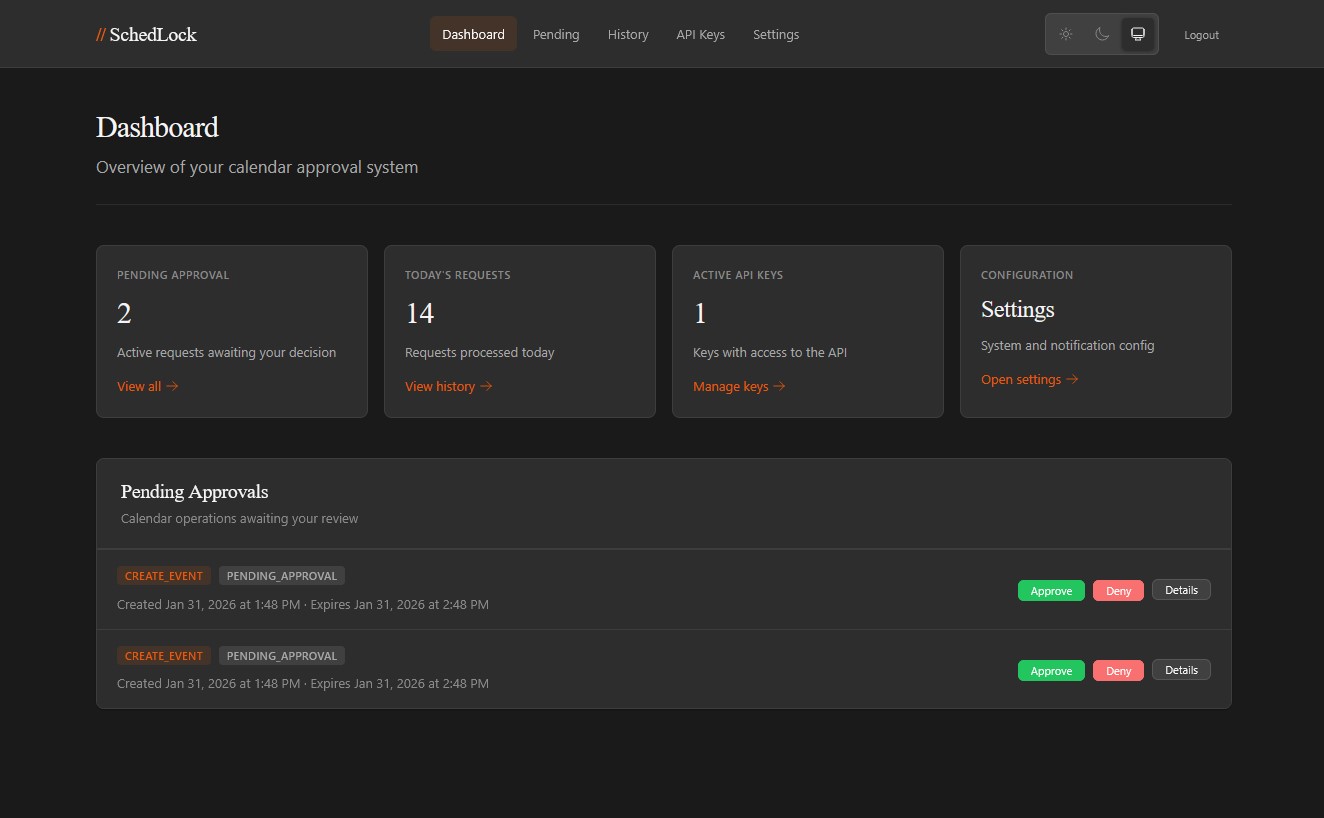
The core idea is simple: SchedLock sits between the agent and the calendar API as a proxy. Read operations pass through with whatever access level you've configured—the agent can see your schedule, check availability, understand what's on the horizon (you can lock these down too if you want). But write operations—creating events, moving meetings, deleting appointments—get captured, held in a pending state, and routed to you for approval before anything touches the actual calendar. You receive a notification through whatever channel you prefer (ntfy, Pushover, Telegram, or a generic webhook for custom integrations), review what the agent wants to do, and approve or deny with a single tap. Only then does the operation execute.
This is human-in-the-loop as architectural principle rather than afterthought. An agent that has been manipulated into scheduling garbage on your calendar will generate a pending request that you can reject; an agent that misunderstands your instructions will surface that misunderstanding before it becomes a problem you have to clean up. The approval flow transforms potential disasters into minor inconveniences.
The system maintains an audit log of everything so you can verify that you remain in control, that nothing has slipped through. This matters more than it might seem. When you grant an agent access to your life, you are entering into a relationship that will develop over time, and relationships require memory to function. The audit log is that memory, the institutional record that prevents the interaction from becoming purely transactional.
The technical implementation uses a three-tier API key system: read keys that can only query, write keys that can submit requests for approval, and admin keys for configuration. API keys are hashed with HMAC-SHA256, OAuth tokens for Google are encrypted with AES-256-GCM, and decision tokens for the approval callbacks are single-use. The notification system supports multiple providers simultaneously, so you can get a push notification on your phone and a webhook to your home automation setup and a Telegram message all at once if you're the paranoid type (which you should be).
The integration with your agents computer use happens through a SKILL.md file that the agent reads to understand how to interact with the proxy. This feels right to me—the agent learns the tool the way a person would learn it, by reading documentation instead of building a complicated exchange server interface. The skill file lives at a URL you provide, and the agent consults it when calendar operations become relevant. There's something philosophically satisfying about this: the agent doesn't get calendar access as a primitive capability or shunted tool but as a learned skill, mediated by instructions that make the human-in-the-loop requirement explicit.
I've been running this for several days now and it works. The agent proposes calendar operations, I get notifications, I approve the ones that make sense and reject the ones that don't, and my calendar remains mine. The latency introduced by the approval flow is real but tolerable—most of the time I'm approving requests within seconds of receiving them, and the agent handles the asynchronous nature of the interaction gracefully.
The project remains a work in progress. I'm massaging the edges, finding the places where the flow could be smoother, but the core is solid, and the architecture is right, and I'm sharing it now because the problem it solves is not mine alone.
The repository is at github.com/davidtorcivia/schedlock. It deploys with Docker, stores state in SQLite, and includes a web UI for configuration and manual approvals when you're at a keyboard rather than on your phone. The README covers setup in detail. If you're running agents with calendar access and you've been wondering how to sleep at night, this is one answer.